DocsKeep it running
Factory reset
Erase your Box and return it to the state it shipped in: what a factory reset deletes, what it keeps, how to start it, and how to set the Box up again afterwards.
Erase your Box and set it up again from scratch. A reset cannot be undone.
Try these first
- Chat not answering: Settings ▾ → Restart Hermes. See Troubleshooting.
- New Wi-Fi network: see Change Wi-Fi or move your Box.
- Forgot your password: email michael.maddison@voxcura.io first. See Change your password.
What it erases and keeps
- Erased: chats and memory, your Signal link, Tailscale, saved Wi-Fi networks, your password (every device is signed out), on-Box backups, customizations.
- Kept: downloaded AI models, the Box ID, and the factory password on the sticker.
Reset your Box
- Open http://box.local and sign in.
- Tap Settings ▾ at the top right, then Factory reset….
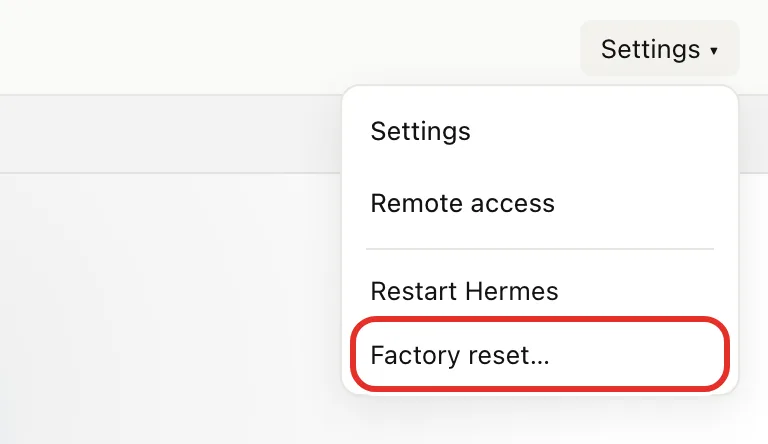
- Tap OK in the browser prompt. This opens a confirmation page; nothing is erased yet.
- Choose one:
- Back up to my USB drive first, then reset (shown if your Box backs up to USB). Leave the drive plugged in; the reset starts once the backup is safe.
- Reset without backing up. Without a USB backup drive, this button reads Yes, factory reset this box.
- Wait about 60 seconds while the page shows Factory resetting….
Set it up again
- Reconnect:
- On Wi-Fi: join the box-setup Wi-Fi network. The setup page usually opens by itself.
- On a network cable: open http://box.local.
- Sign in with the factory password on the sticker.
- Follow Set up your Box.
- To restore a backup, tap Restore from my backup or Have a backup of this Box? Restore it instead on the Choose your password page. You need the password from when the backup was made.
- Set up the extras again: Tailscale, Signal, other devices.
If something goes wrong
- "Backup didn't finish": the Box was not reset. Check the drive and start again, or choose Reset without backing up.
- USB drive plugged in but not offered: tap Cancel, then Settings → Backups → Use this drive.
- Changed your mind during the backup: tap Cancel — don't reset.
- Your phone lost its connection to the Box: expected on Wi-Fi. Join box-setup.
- Box doesn't come back after a few minutes: email michael.maddison@voxcura.io. See Get help.
Verified on Box software 0.2.8 · 2026-10-05